
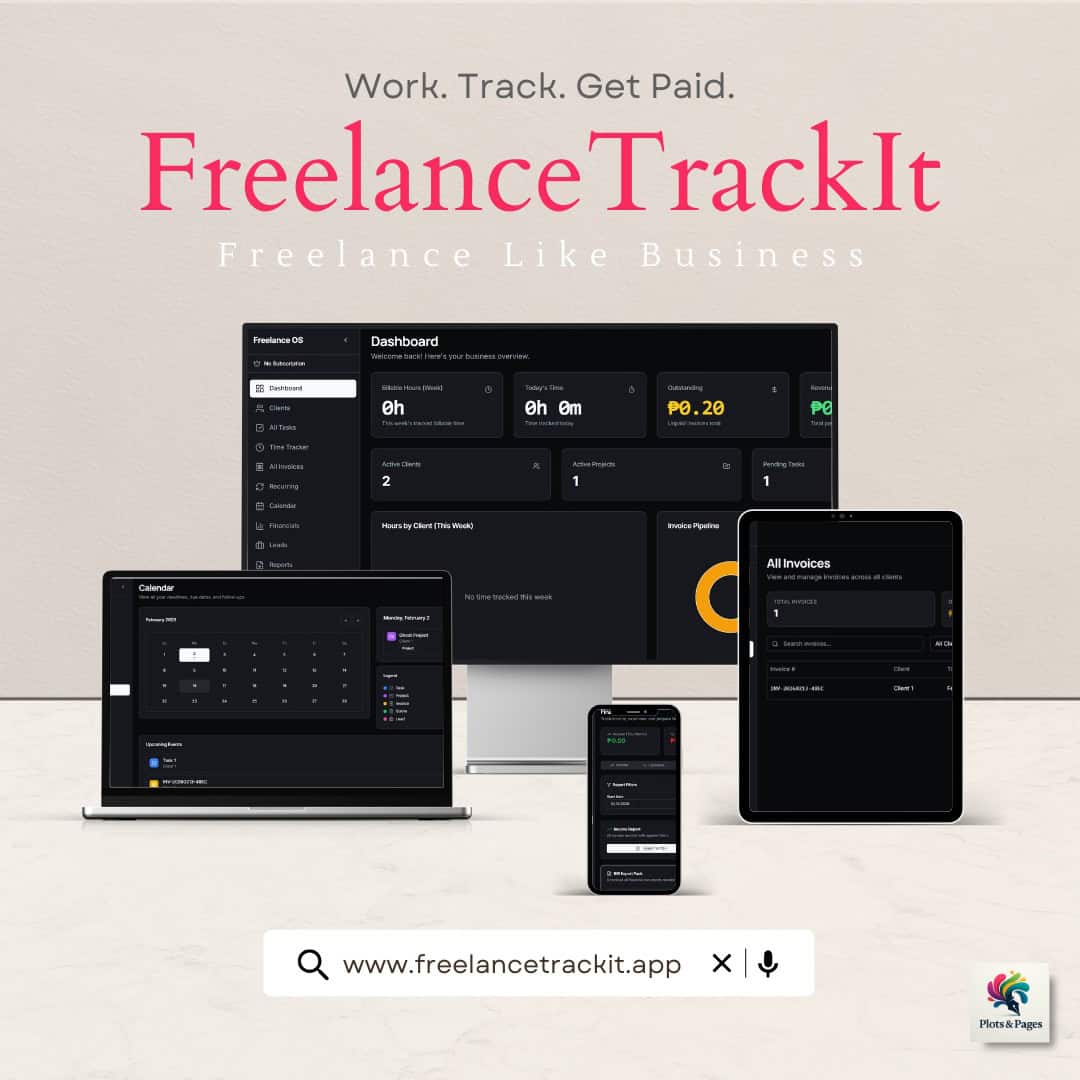
Most freelancers do not actually have a system for running their work. What they have is a collection of tools that slowly built up over time. A spreadsheet for tracking income. A notes app for client details. A timer for billable hours. A separate platform for invoices. It works in the beginning because there is not much to manage, but once you start handling multiple clients, that setup becomes harder to keep up with. Information gets scattered, tasks slip through, and it becomes difficult to see how your work is actually translating into income.
This is where tools like FreelanceTrackIt come in. Instead of adding another app into the mix, the idea is to replace that fragmented setup with one place where clients, time tracking, invoices, tasks, and financial tracking all live together. It is built around a simple premise: freelancers should not have to manage five different systems just to keep their business organized.
In this guide, the goal is not just to list features, but to break down how FreelanceTrackIt works in practice, what it is designed to solve, and who it actually makes sense for. If you are currently managing freelance work across multiple tools and starting to feel the friction of that setup, this is the kind of app worth looking into.
Why So Many Freelancers End Up Using Too Many Tools
Most freelancers do not start with a complicated system. In the beginning, it is usually just about getting the work done. A simple spreadsheet is enough to track payments. Notes are scattered across whatever app is easiest to open. Time is either loosely tracked or remembered at the end of the day. Invoices are created when needed, often using a separate tool or template. It feels manageable because there are only one or two clients to think about.
The shift happens quietly. As more clients come in, each part of the workflow starts to grow on its own. You add a proper time tracker to avoid undercharging. You create a more structured way to manage tasks. You start organizing client details more carefully. Eventually, you end up with multiple tools that each handle a different part of your freelance work. On paper, it looks efficient. In practice, it becomes fragmented.
The real issue is not just the number of tools. It is the lack of connection between them. Your time tracker does not talk to your invoices. Your client notes live somewhere else. Your income tracking sits in a spreadsheet that needs to be updated manually. You spend more time switching between apps, double-checking information, and making sure nothing slips through than actually improving how you work.
This is where things start to break down. Hours get missed or undercounted. Invoices get delayed. It becomes harder to see how much you are actually earning across clients. Even simple questions like “How much did I make this month?” or “Which client is taking most of my time?” take longer to answer than they should. The system is not failing because the tools are bad. It is failing because everything is disconnected.
At a certain point, the problem is no longer about finding better individual tools. It becomes about finding a way to bring everything together into one clear workflow. That is the gap an all-in-one freelance management app is trying to fill.
Where FreelanceTrackIt Fits Into That Problem
Once the issue shifts from “which tools should I use” to “why does my workflow feel scattered,” the solution changes as well. Adding another app rarely fixes anything. In fact, it often makes things worse by introducing another place to check, update, and maintain. What most freelancers actually need at that point is not a better tool, but a clearer system.
This is where FreelanceTrackIt positions itself differently. Instead of trying to compete with individual tools like time trackers, invoice generators, or task managers, it brings those functions into one connected workflow. The focus is not on doing one thing better than everything else, but on making sure the essential parts of freelance work actually work together.
That distinction matters. When your client information, tracked hours, tasks, invoices, and income all live in the same place, the process becomes more consistent. You are not piecing together your day across multiple platforms or relying on memory to connect everything. Each part of your work feeds into the next, which reduces the friction that usually builds up behind the scenes.
For freelancers handling multiple clients, this kind of structure becomes less of a convenience and more of a necessity. The more moving parts you have, the more valuable it is to see everything clearly without having to assemble it yourself every time. Instead of asking, “Where did I put that?” or “Did I already invoice this?” you start working from a system that keeps those answers in front of you.
FreelanceTrackIt is built around that idea. It is not just another tool to add to your stack, but an attempt to replace the stack entirely with something more cohesive.
What Is FreelanceTrackIt?

FreelanceTrackIt is an all-in-one freelance management app designed to help freelancers organize the core parts of their work in one place. Instead of relying on separate tools for client tracking, time logs, invoices, financial tracking, and tasks, it brings those functions into a single, connected system that is easier to manage day to day.
At its core, the app is built around how freelance work actually flows. You take on clients, spend time completing tasks, bill for that work, and track what you earn. In many setups, those steps are handled across different platforms, which creates gaps between them. FreelanceTrackIt closes those gaps by keeping each part of the process tied together, so information does not need to be manually transferred or reconstructed.
This kind of setup becomes especially useful once freelance work starts to scale. Managing one client can be simple enough without much structure, but handling several clients at the same time introduces more moving parts. Work hours need to be tracked more accurately, invoices need to be sent consistently, and income needs to be monitored with more clarity. Without a centralized system, those responsibilities tend to spread out and become harder to control.
Rather than focusing on a single feature, FreelanceTrackIt is designed to support the entire operational side of freelancing. It acts as a central workspace where client information, tracked time, tasks, invoices, and financial data all connect, making it easier to see how your work is progressing and how it translates into actual earnings.
What Is FreelanceTrackIt For?
FreelanceTrackIt is built for the operational side of freelancing, the part that sits behind the actual work. It is not about helping you design better, write faster, or code more efficiently. It is about managing everything around that work so it stays organized, trackable, and financially clear.
At a practical level, the app is meant to handle the recurring responsibilities that come with freelance work. Keeping client information organized so nothing gets lost between projects. Tracking the time you spend so billable hours are accounted for accurately. Creating invoices without needing a separate platform. Monitoring income in a way that makes it easier to understand how much you are actually earning across different clients.
These are all things freelancers already do, but often in disconnected ways. One tool for tracking time, another for invoices, a spreadsheet for income, and scattered notes for client details. FreelanceTrackIt brings those responsibilities into one place so they can be handled within a single workflow instead of being split across multiple systems.
It is also designed to reduce the kind of small inefficiencies that build up over time. Switching between apps to gather information. Manually transferring data from one tool to another. Double-checking whether something has already been invoiced or tracked. These are not major problems on their own, but they add up quickly, especially when you are managing several clients at once.
In that sense, FreelanceTrackIt is less about adding new capabilities and more about simplifying existing ones. It takes the processes freelancers already rely on and organizes them into a structure that is easier to maintain, easier to review, and easier to scale as your workload grows.
Who FreelanceTrackIt Is Best For
FreelanceTrackIt makes the most sense for freelancers who are already managing a steady flow of work and are starting to feel the weight of keeping everything organized. It is especially relevant for those handling multiple clients at the same time, where tracking hours, deliverables, invoices, and payments becomes part of the daily routine rather than an occasional task.
Freelancers in roles like virtual assistance, writing, design, marketing, development, and consulting tend to benefit the most from this kind of setup. These are fields where work is often ongoing, client relationships are long-term, and billing is tied closely to time or deliverables. In these situations, having a clear system for tracking both work and income is not just helpful, it becomes necessary to maintain consistency and avoid losing track of details.
It is also a strong fit for freelancers who have outgrown simple setups like spreadsheets or loosely organized notes. If your current workflow involves jumping between multiple apps just to piece together a full picture of your work, FreelanceTrackIt is designed to replace that kind of fragmentation with something more structured. The value comes from being able to see clients, tasks, tracked time, and earnings in one place without having to manually connect them.
At the same time, it may not be essential for everyone. Freelancers who only take on occasional projects or work with a single client at a time might not feel the same level of friction that this app is meant to solve. If your current system is simple and still easy to manage, an all-in-one platform could feel like more than you need.
The key difference is complexity. The more moving parts your freelance work has, the more useful a centralized system becomes. FreelanceTrackIt is built for that stage, where staying organized is no longer optional and clarity across your work and income starts to matter more.
Core Features of FreelanceTrackIt (What It Actually Does)
FreelanceTrackIt brings together the main components of a freelance workflow into one system. Instead of treating each feature as a separate tool, the app connects them so that information flows from one part of your work to the next. Below is a breakdown of the core features and how they function in practice.
Central Dashboard
The dashboard acts as the main overview of your freelance activity. It gives you a snapshot of your clients, ongoing tasks, tracked time, and earnings without needing to open multiple sections or tools.
This becomes useful when you want a quick understanding of where your work stands. Instead of checking different apps to piece together your day or week, you can see your workload and progress in one place. It reduces the need to mentally track everything yourself, especially when handling multiple projects at once.
Client Tracking

FreelanceTrackIt allows you to organize and manage your clients within the system, keeping related work tied to each client rather than scattered across notes or separate apps.
This matters because client work rarely exists in isolation. Tasks, time logs, and invoices are all connected to specific clients, and having that relationship clearly structured makes it easier to manage ongoing projects. It also helps reduce the chances of missing details or losing context when switching between different clients throughout the day.
Time Tracking

The time tracking feature is designed to help you record the hours you spend on different tasks and clients. This is especially important for freelancers who bill hourly or want a clearer picture of how their time is being used.
In practice, this helps prevent undercounting work, which is a common issue when relying on memory or rough estimates. Over time, it also gives you insight into how long certain types of work actually take, which can influence pricing, scheduling, and workload decisions.
Invoice Generator (With Recurring Invoices)

FreelanceTrackIt includes an invoice generator that allows you to create and manage invoices directly within the app. It also supports recurring invoices, which can be set up for clients on retainers or ongoing agreements.
This removes the need to switch to a separate invoicing platform and keeps your billing process tied to your tracked work. Recurring invoices are particularly useful for reducing repetitive admin tasks, as they automate part of the process for consistent, repeat clients.

Financial Tracking

The financial tracking feature helps you monitor your income across clients and projects. Instead of maintaining a separate spreadsheet, you can see how much you are earning directly within the same system where your work is tracked.
This makes it easier to understand the relationship between your time, your clients, and your income. It also reduces the need for manual updates and helps keep your financial view aligned with your actual workload.
Reports and Exporting

FreelanceTrackIt allows you to generate reports and export your data when needed. This is useful for reviewing your performance over time or preparing information for accounting purposes.
Having access to structured data without needing to manually compile it saves time and reduces errors. It also makes it easier to look back at your work and identify patterns in your productivity or income.
Task Management

The task management system lets you organize your workload and keep track of deliverables across different clients. Tasks can be viewed and managed within the same environment as your time tracking and client information.
This helps ensure that execution stays connected to the rest of your workflow. Instead of managing tasks in isolation, they remain linked to the clients and work they belong to, making it easier to stay organized and prioritize effectively.
Each of these features on its own is not new. What makes FreelanceTrackIt different is how they are structured together. Instead of functioning as separate tools, they operate within a single system, which reduces fragmentation and makes the overall workflow easier to manage.
What FreelanceTrackIt Replaces in a Typical Freelance Setup
Most freelance workflows do not break because of one bad tool. They become difficult to manage because each part of the work lives in a different place. Over time, you build a stack that looks functional on the surface but requires constant effort to maintain.
A common setup might include a spreadsheet for tracking income, a notes app for client details, a separate timer for billable hours, another platform for creating invoices, and some form of task manager to keep track of deliverables. Each tool serves a purpose, but none of them are connected. You end up acting as the system that holds everything together, moving information from one place to another just to keep things aligned.
This is where FreelanceTrackIt changes the structure. Instead of relying on a combination of tools, it brings those core functions into one environment. Client information, tracked time, tasks, invoices, and income are all part of the same workflow, which means they do not need to be manually tied together. When you log hours, they are already connected to a client. When you create an invoice, it can reflect the work that has been tracked. When you review your earnings, the data is already there without needing to update a separate sheet.
The value here is not just consolidation, but clarity. You are no longer piecing together your business from different sources or double-checking whether everything matches. The system holds the connections for you, which reduces the chances of missing details and makes your workflow easier to follow from start to finish.
It also reduces the kind of small inefficiencies that are easy to ignore but expensive over time. Switching between apps, re-entering the same information, checking multiple places to confirm one detail. These are not major problems individually, but they add up, especially as your client load increases. Replacing that fragmented setup with a single system removes a lot of that friction without requiring you to rethink how freelance work itself is done.
FreelanceTrackIt does not introduce a new way of working. It organizes the way you are already working into something more consistent, which is what makes it easier to adopt and more useful as your workload grows.
How FreelanceTrackIt Fits Into a Real Freelance Workflow

The easiest way to understand FreelanceTrackIt is to look at how it fits into the natural cycle of freelance work. Most freelancers follow a similar pattern, but the difference is whether that process feels smooth or scattered. When everything is connected, the workflow becomes easier to manage without needing constant effort to keep things aligned.
When a new client comes in, the first step is simply adding them into the system. Instead of keeping client details in notes or scattered messages, everything starts in one place. From that point forward, any work related to that client stays connected, whether it is tasks, tracked time, or invoices. This removes the need to search across different apps just to find context.
As work begins, time tracking becomes part of the process rather than an afterthought. Logging hours as you go makes it easier to capture billable time accurately, especially for freelancers who juggle multiple projects in a single day. Over time, this also builds a clearer picture of how long different types of work actually take, which is useful for pricing and planning.
Tasks and deliverables sit alongside that work instead of being managed separately. This means you are not switching between a task manager and a time tracker just to stay organized. Everything related to execution stays within the same environment, making it easier to see what needs to be done and what has already been completed.
When it is time to invoice, the process becomes more direct. Instead of moving to a different tool and manually pulling together information, you can generate invoices within the same system where the work has been tracked. For recurring clients, setting up recurring invoices reduces the need to repeat the same steps each cycle.
As payments come in, income tracking happens naturally within the same workflow. There is no need to update a separate spreadsheet or reconcile numbers across platforms. Your earnings reflect the work you have already logged, which makes it easier to see how each client contributes to your overall income.
At the end of the month, reviewing your work becomes a lot more straightforward. Reports and exports allow you to look at your time, tasks, and income without needing to compile data manually. Instead of reconstructing your month from different sources, the information is already organized and ready to review.
This is where the shift happens. It stops feeling like you are managing a collection of tools and starts feeling like you are working inside a system. Each step leads into the next, which reduces friction and makes the overall process easier to maintain as your workload grows.
Why This Matters More Once You Have Multiple Clients

Managing one client is straightforward. You can rely on memory, keep notes loosely organized, and still stay on top of your work without much structure. Even if your system is not perfect, the margin for error is small enough that it does not cause major issues.
That changes quickly once you start handling multiple clients at the same time. Each new client adds another layer of work to track, another set of tasks to manage, and another stream of income to monitor. What used to be simple becomes harder to follow, not because the work itself is more difficult, but because there are more moving parts involved.
This is where fragmented systems start to show their limits. Switching between tools becomes more frequent. It takes longer to confirm details. You spend more time checking whether something has been tracked, invoiced, or completed. Small gaps in your process begin to matter more, especially when they affect billable hours or payments.
Over time, this can lead to subtle but real losses. Hours that are not fully recorded. Invoices that are delayed or overlooked. A lack of clarity around how much you are actually earning across different clients. These are not always obvious problems, but they compound as your workload grows.
A more structured system becomes valuable at this stage because it reduces that uncertainty. When your clients, tasks, tracked time, and income are all connected, you do not have to reconstruct your workflow every time you need an answer. The information is already there, which makes it easier to stay consistent and avoid unnecessary friction.
The key shift is control. Instead of reacting to your workload and trying to keep everything together manually, you are working within a system that supports how your freelance business actually runs. As the number of clients increases, that level of clarity becomes less of a convenience and more of a requirement.
FreelanceTrackIt is built for that stage. It is not just about staying organized when things are simple, but about maintaining clarity when your freelance work starts to scale.

FreelanceTrackIt Pricing
FreelanceTrackIt starts at PHP 499 per month, which comes out to roughly USD $9 to $10 or CAD $12 to $14, depending on exchange rates. On its own, that price point sits in the lower range compared to many specialized tools, especially those that handle time tracking, invoicing, or project management separately.
The more useful way to look at the cost, though, is not in isolation. Most freelancers who reach the point of needing better organization are already using multiple tools, whether paid or free. A time tracker, an invoicing platform, a task manager, and some form of financial tracking system all come with their own costs, either in subscriptions or in the time it takes to maintain them. When those tools are not connected, you also spend extra time moving information between them, which adds another layer of hidden cost.
FreelanceTrackIt positions itself as a replacement for that kind of setup. Instead of paying for several tools or managing a system that requires constant manual updates, the app brings those functions together into one place. That shift is where the value becomes clearer. It is not just about saving on subscriptions, but about reducing the time and effort spent keeping your workflow organized.
For freelancers who bill by the hour or manage multiple clients, even small improvements in efficiency can make a difference. Saving one or two billable hours in a month, or avoiding missed or delayed invoices, can easily offset the cost of the app. In that context, the pricing becomes less about the monthly fee and more about how much clarity and consistency it adds to your workflow.
Ultimately, the cost makes the most sense when you view FreelanceTrackIt as a system rather than a single tool. If your current setup already feels fragmented or time-consuming to maintain, the price is relatively low compared to the friction it is designed to remove.
Is FreelanceTrackIt Worth It?
Whether FreelanceTrackIt is worth using depends less on the app itself and more on where you are in your freelance workflow. The value becomes clearer once your work reaches a point where staying organized starts taking more effort than it should.
For freelancers managing multiple clients, the case is easier to make. When your time, tasks, invoices, and income are spread across different tools, the friction adds up quickly. In that situation, having everything connected in one system can reduce the amount of manual work required to keep things aligned. It also makes it easier to see how your work translates into actual earnings, which is something many freelancers struggle to track consistently.
It also tends to make sense for freelancers who are already earning regularly and want more control over the operational side of their work. At that stage, the goal is not just to complete tasks, but to run your freelance work more like a structured business. Tools that improve visibility and consistency become more valuable because they support how you scale your workload over time.
On the other hand, if your freelance work is still occasional or limited to one client, the need for an all-in-one system may not feel as urgent. Simpler setups can still work in those cases, especially if the volume of work is low and easy to manage without much structure.
The difference comes down to complexity. As your freelance work grows, so does the need for clarity across everything you are managing. FreelanceTrackIt is built for that transition, where the problem is no longer doing the work itself, but keeping the entire process organized.
For freelancers who are tired of managing clients, time, invoices, and income across disconnected tools and want a more cohesive system, FreelanceTrackIt makes a strong case. It is less about adding another app and more about replacing a setup that no longer scales well.
Pros and Cons
Every tool works best in a specific context. FreelanceTrackIt is no different. The value comes from how well it fits your current workflow and how much friction it removes compared to what you are already using.
Pros
One of the biggest advantages is consolidation. FreelanceTrackIt brings together client tracking, time tracking, invoicing, financial monitoring, and task management into one system. This reduces the need to switch between multiple tools and helps keep everything connected.
It also improves visibility across your work. Because time, tasks, and income are tied together, it becomes easier to understand how your effort translates into earnings. This is especially useful for freelancers managing several clients at once.
The inclusion of recurring invoices adds practical value for ongoing work. For freelancers with retainers or repeat billing cycles, this reduces repetitive admin tasks and helps maintain consistency in payments.
Another strength is its accessibility in terms of pricing. Compared to subscribing to several specialized tools, the cost remains relatively low while covering multiple core functions.
Cons
The main tradeoff is adjustment. If you are used to working across different tools, moving everything into one system can take time. There is a short period of setup and habit-building before the workflow starts to feel natural.
It may also feel unnecessary for freelancers with very simple setups. If you are only managing one client or handling occasional projects, the benefits of an all-in-one system might not fully apply yet.
There is also the general limitation that comes with any consolidated tool. While it covers multiple functions, it may not go as deep in each area as highly specialized apps. For most freelancers, the benefit of having everything connected outweighs this, but it is still something to consider depending on how specific your needs are.
Why I’m Recommending FreelanceTrackIt
What makes FreelanceTrackIt worth recommending is not that it introduces something completely new, but that it brings together the parts of freelance work that are usually handled separately and makes them function as one system. Most freelancers already use tools for time tracking, invoicing, client management, and financial tracking. The difference here is that those functions are not isolated from each other.
That shift is more important than it sounds. When your workflow is spread across different platforms, you end up doing extra work just to keep everything aligned. You move information from one tool to another, double-check details, and rely on memory to connect pieces that should already be connected. Over time, that becomes a quiet source of friction that slows things down.
FreelanceTrackIt addresses that by keeping everything in one place, which makes the workflow easier to follow and maintain. Instead of thinking in terms of separate tools, you start thinking in terms of a single system where each part of your work feeds into the next. That alone can make a noticeable difference in how manageable your workload feels, especially as you take on more clients.
It is also a practical recommendation because it does not require you to change how you work at a fundamental level. The structure is built around the natural flow of freelance work, so you are not learning a completely new process. You are simply organizing what you are already doing in a way that is more consistent.
For freelancers who are past the early stage of figuring things out and are starting to prioritize clarity, efficiency, and control, FreelanceTrackIt fits that transition well. It is not about adding complexity, but about removing the need to manage complexity manually.
How to Get Started With FreelanceTrackIt
Getting started with FreelanceTrackIt does not require a complicated setup. The app is designed to follow the natural flow of freelance work, so the process is more about organizing what you already do rather than learning something entirely new.
The first step is to create an account and get access to the dashboard. From there, you can begin by adding your clients into the system. This establishes the foundation, since everything else, tasks, time tracking, and invoices, will be connected to those clients moving forward.
Once your clients are set up, you can start using the time tracking feature during your work sessions. Instead of estimating hours later, logging time as you go helps build a more accurate record of your work. This becomes especially useful when you begin generating invoices, as your tracked time is already tied to the relevant client and tasks.
Next, you can organize your deliverables using the task management system. Keeping tasks within the same environment as your time tracking and client information helps maintain a clear view of what needs to be done and what has already been completed. It reduces the need to switch between different apps just to stay organized.
When it is time to bill, you can create invoices directly within the platform. For ongoing work, setting up recurring invoices helps streamline the process and reduces the need to repeat the same steps each cycle. As payments come in, your income is tracked within the same system, giving you a clearer picture of your earnings without needing a separate spreadsheet.
Over time, as more data builds up, you can use reports and exports to review your work, track performance, and prepare for accounting if needed. What starts as a simple setup gradually becomes a structured system that reflects how your freelance business operates.
If you want to see how FreelanceTrackIt fits into your own workflow, you can explore it here: https://freelancetrackit.app/?ref=3E38FFB9
Should You Switch to an All-in-One Freelance System?
At some point, every freelancer runs into the same decision. Do you keep patching together a system that technically works, or do you move everything into something more structured?
If your current setup still feels easy to manage, there is no urgent reason to change. Simple workflows can carry you for a while, especially when the number of clients and projects is low. But once your work starts to grow, the cracks become harder to ignore. You spend more time organizing than necessary, you double-check information across tools, and it becomes less clear how your time translates into income.
That is the point where switching to a more connected system starts to make sense.
FreelanceTrackIt is built for that transition. It does not try to replace the way freelance work is done, but it does change how that work is managed behind the scenes. By bringing clients, time tracking, tasks, invoices, and financial data into one place, it reduces the need to constantly maintain your own system across different tools.
The benefit is not just convenience. It is clarity. When everything is connected, it becomes easier to see what you are working on, how much time you are spending, and how that translates into actual earnings. That level of visibility is what allows freelancers to operate with more consistency as their workload increases.
If you are at a stage where your workflow feels scattered or harder to manage than it should be, switching to an all-in-one system like FreelanceTrackIt is a practical step forward.
Frequently Asked Questions About FreelanceTrackIt
What is FreelanceTrackIt?
FreelanceTrackIt is an all-in-one freelance management app designed to help freelancers manage clients, track time, create invoices, organize tasks, and monitor income in one place. It is built to replace the need for multiple separate tools by bringing these functions into a single workflow.
What is FreelanceTrackIt used for?
It is used to manage the operational side of freelancing. This includes organizing client information, tracking billable hours, creating and sending invoices, monitoring income, and keeping tasks connected to active work.
Does FreelanceTrackIt include invoicing?
Yes, FreelanceTrackIt includes an invoice generator that allows you to create invoices within the platform. It also supports recurring invoices, which are useful for freelancers who work with retainers or ongoing client agreements.
Can FreelanceTrackIt help track freelance income?
Yes, the app includes financial tracking features that allow you to monitor your income across clients and projects. This helps create a clearer view of your earnings without needing a separate spreadsheet.
Who is FreelanceTrackIt best for?
It is best suited for freelancers managing multiple clients who want a more organized and connected workflow. It is especially useful for those who feel their current setup is too fragmented or time-consuming to maintain.
How much does FreelanceTrackIt cost?
FreelanceTrackIt starts at PHP 499 per month, which is approximately USD $9 to $10 or CAD $12 to $14 depending on exchange rates.
Explore FreelanceTrackIt
If your freelance workflow is currently spread across multiple tools and starting to feel harder to manage, this is where an all-in-one system becomes worth considering.
FreelanceTrackIt is designed to bring clients, time tracking, invoices, tasks, and income into one place so you can manage your work with more clarity and less friction.
You can take a closer look and see how it fits your workflow here: https://freelancetrackit.app/?ref=3E38FFB9
If you found this piece insightful, consider supporting my work – every contribution helps fuel more in-depth stories, reflections, and meaningful content. Support here!